Engula Bench – Baseline Performance Comparison Tool
Document Version: v2.1 Last Updated: 2025-09-19 Maintained by: Engula Performance Engineering Team
Overview
Engula Bench is an official benchmarking tool designed to measure and compare the Get/Set throughput and latency performance of Engula 2.1 against Redis 7.2. It enables standardized, reproducible performance evaluations across multiple system configurations and data sizes.
1. Design Goals and Methodology
1.1 Objectives
To provide a consistent and transparent framework for evaluating the baseline in-memory performance of Engula compared to Redis under varying CPU configurations and value sizes.
1.2 Key Metrics
- QPS (Throughput): Number of queries processed per second (higher is better)
- P50 (Median Latency): Median response time, representing average latency under load
1.3 Test Methodology
- Single-Instance Comparison: Persistence disabled to isolate in-memory operation and protocol processing performance
- I/O Thread Configurations:
io-threads ∈ {1, 2, 4} - Controlled Test Parameters: Fixed data scale, request distribution, and concurrency model for repeatable results
- Value Sizes: 8B, 32B, 128B, 512B, 1KB, and 2KB
2. Product Overview
2.1 Test Workflow
- Service Startup: Launch Redis or Engula instances, specifying I/O threads and CPU affinity.
- Stress Testing: Execute three formal test runs; compute average results.
- Result Collection: Record QPS and P50 latency; capture and persist raw log data.
2.2 Test Data Parameters
- Total Keys: 1,000,000
- Value Sizes: 8B, 32B, 128B, 512B, 1KB, 2KB (each tested independently)
2.3 Command Examples
Example: Benchmark on a dual-core server with 128B value size:
For other test setups, adjust the assigned CPU cores and data size parameters as necessary.
3. Usage Instructions
Engula Bench can be used as a standalone Docker container for reproducible, environment-independent benchmarking.
3.1 Runtime Environment Requirements
| Component | Minimum Requirement |
|---|---|
| Operating System | CentOS ≥ 7.9 / Ubuntu ≥ 18.04 |
| Docker | Official Docker distribution |
| CPU | ≥ 8 physical or virtual cores recommended |
| Glibc | Version ≥ 2.34 |
Supported on Linux and macOS environments.
3.2 Running Engula Bench
Upon execution, progress will be displayed as shown below:
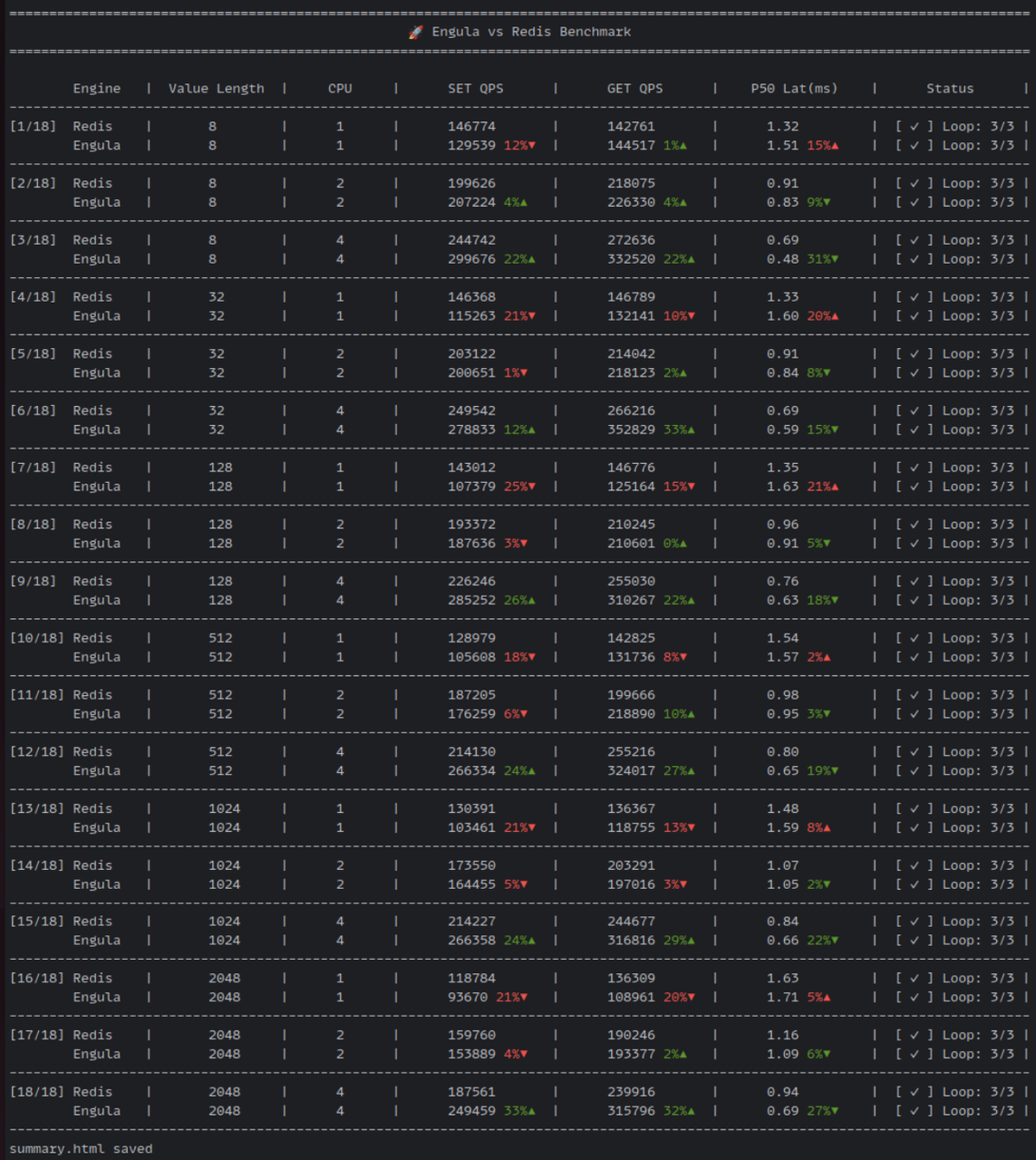
Test Duration: A total of 18 test groups (each executed for both Redis and Engula, three iterations per group) are automatically run. Total runtime is approximately 40 minutes.
3.3 Viewing Results
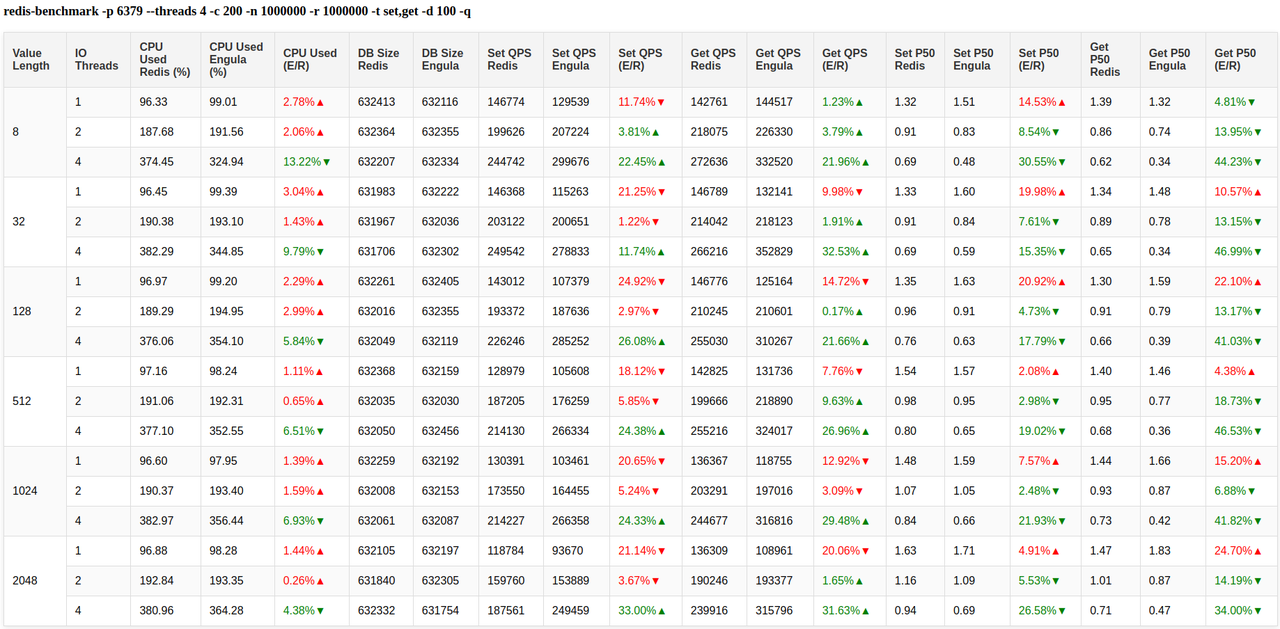
After successful completion, results are compiled into a summary.html report file in the working directory.
Open this file in any modern browser to view a visual comparison of QPS and latency data.
4. FAQ
4.1 My environment does not support Docker. Is there a binary version available?
Yes. A standalone binary package is available upon request. Please contact the Engula team and provide the following information for compatibility:
- Operating system version
- CPU architecture
- Other relevant system details
Once obtained, extract and execute the binary as follows:
Execution flow and output format are identical to the Docker-based process described in Section 3.2.
4.2 Why does the terminal output scroll continuously during execution?
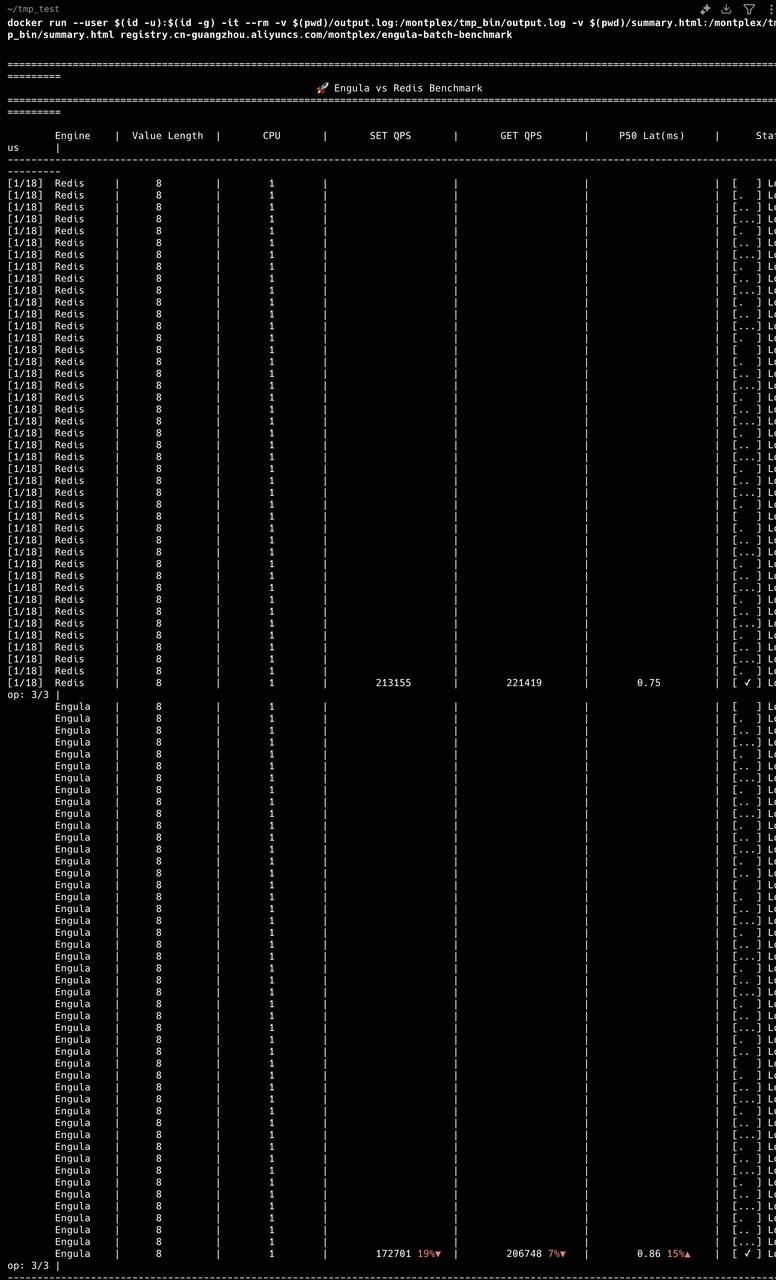
This occurs when the output line width exceeds the terminal window width. Because the carriage return (\r) only resets to the beginning of the current line, multi-line wrapping prevents proper overwriting and results in continuous line scrolling.
Solution: Reduce terminal font size and increase the terminal window width to accommodate the full output line.
5. Conclusion
Engula Bench provides a robust, repeatable benchmarking framework aligned with Redis performance testing methodologies. It enables precise evaluation of Engula’s throughput, latency, and resource efficiency across hardware environments—helping users validate performance expectations before deployment.